network-xray gallery
The Network Understanding Layer. AI makes networks easier to operate — X-Ray makes them easier to understand.
network-xray turns live router & network state (OSPF/BGP adjacency, routes, interfaces) into a
picture you can reason about — where the packet goes, why the route is (or isn't) there, and how a
failure propagates and recovers. It renders a topology view and an "inside the router" DeepDive
cylinder. It runs on top of your execution engine — paste a containerlab topology, replay a
recorded lab, or point it at live FRR / SR Linux — the "why" layer above the "what". It is
vendor-neutral (FRR is the native, first-class input; Cisco IOS or anything else via a small
adapter) and descriptive, not a simulator (it draws the real state you report). You drive it with a
few calls:
renderTopology · applyState · startPolling · openDeepDive.
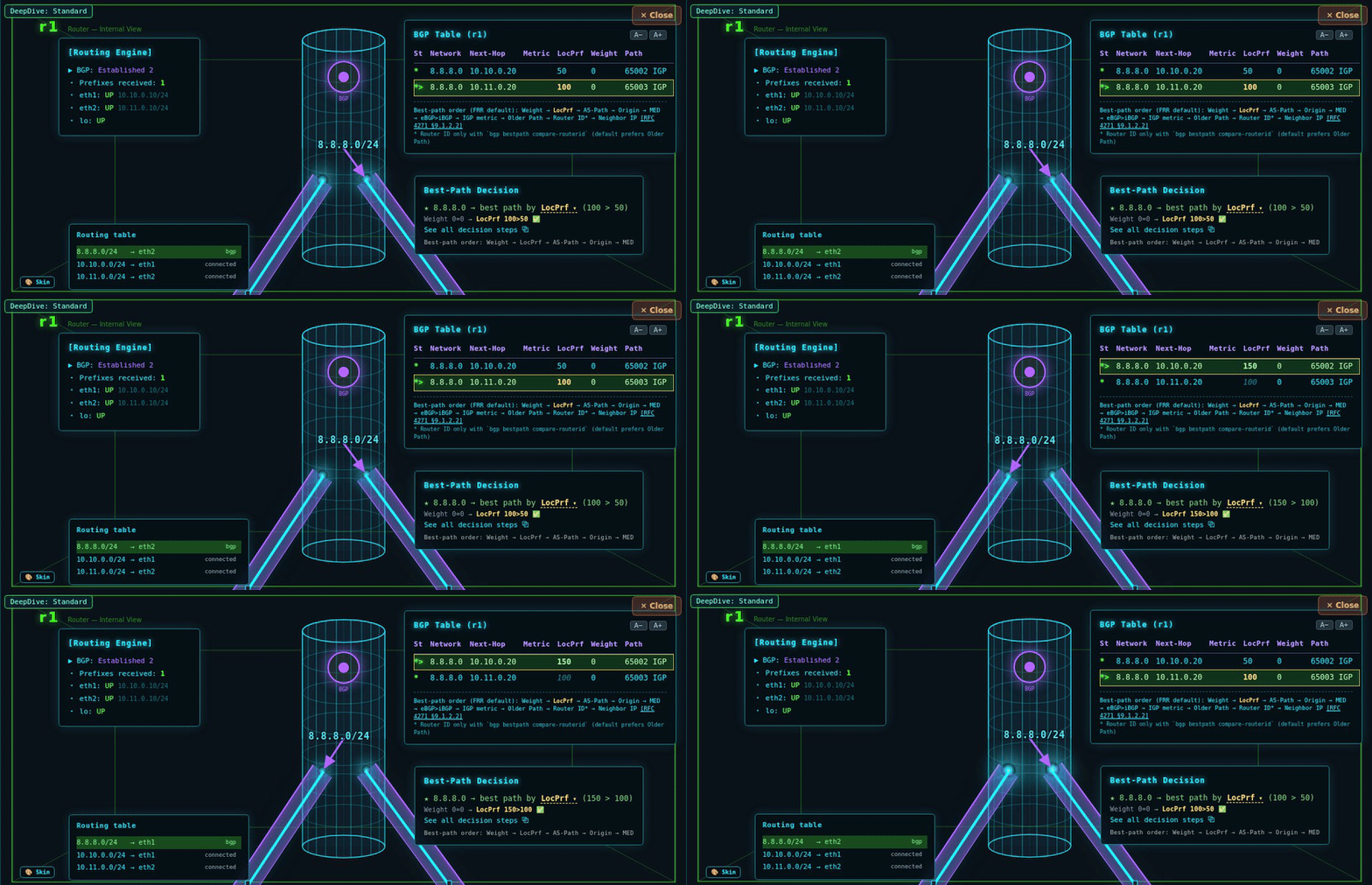
Why this route? —
8.8.8.0/24 is heard from two upstreams; change the Local Preference and the winning path flips in place, no reload. X-Ray reads the real FRR state and re-decides — it's descriptive, not a simulator.
▶ Open the recorded Best-Path demo — no install →
Or see the whole flow in one screen: topo-explorer — topology view + live prefix trace + BGP table + Best-Path Decision, side by side (drag nodes, break a link, watch it re-route).
▶ Every demo runs the same engine as RouteCrushLab — hands-on FRR troubleshooting labs in your browser (no install, no signup).
Examples
Paste your FRR router output → renderFRR · bring your own data
Paste an FRR router's
show ip route + show ip ospf neighbor and press
Render. The local topology is reconstructed (incl. peer–peer links from equal-cost routes) and drawn.FRR show text · topology inference · DeepDive
Paste your BGP table → renderbring your own data
Paste a router's
show bgp summary + show ip bgp and press Render.
Its eBGP neighbors are drawn with the session state, and the cylinder shows the BGP processor and the
prefixes it learned. Small eBGP from one router's view.FRR show text · eBGP session · learned routes · DeepDive
Paste your containerlab topology → renderbring your own data
Paste a
.clab.yml and press Render. Your lab's nodes & links are mapped to an
X-Ray diagram — step the OSPF state, cut a link, open a router to look inside. Small FRR labs (2–3 nodes:
link / path / triangle).clab YAML → topology · OSPF state · fault · DeepDive
Paste your SR Linux node state → renderNokia srlinux
Run
clab-srl-collect.js on a live Nokia SR Linux node and paste the JSON.
The same single-node panel (routing · BGP · Best-Path) the FRR collector drives renders it —
the engine is vendor-neutral, only the state source differs (YANG sr_cli … as json).SR Linux sr_cli → node panel · OSPF/BGP · live-verified
Recorded live lab — watch OSPF converge & recoverno install
Four real frames captured from a running FRR / containerlab lab, replayed in the browser
with no backend: steady → a link drops and a router goes isolated → OSPF re-forms (2-Way) → converged.
Click any node to look inside as it changes — the same DeepDive a live
containerlab graph draws.recorded replay · per-node DeepDive · LSDB · zero setup
Recorded live lab — eBGP sessions & the BGP tableno install
The BGP version of the replay: three real frames from an eBGP lab (AS65001/65002/65003) —
all Established → a link drops and a router is isolated (session down, routes withdrawn) → re-established.
Open a node to watch its BGP table (next-hop, AS-path, best) gain and lose prefixes.
recorded replay · per-node DeepDive · BGP table · zero setup
Best-Path Decision — why one BGP route winsno install
An eBGP lab where 8.8.8.0/24 is heard from two upstreams with different LocPref (100 vs 50).
Open r1: the BGP table shows both candidates and a Best-Path Decision panel explains the winner
(LocPref 100 > 50), then the link drops so only one path remains, then it's restored.
competing paths · best-path reasoning · per-node DeepDive · zero setup
BGP Best-Path Decision — the criteria, step by stepno install
A decision bracket for one prefix: two candidate paths run down the core best-path
criteria (Weight → Local Preference → AS-Path → Origin → MED → eBGP → Router ID) as a tournament.
Evaluation stops at the row that decides the winner — the rows below are never evaluated.
Standalone, no engine or backend.
core best-path criteria · step-by-step bracket · self-contained
OSPF adjacency formationCCNA instructor
Step the 7 OSPF neighbor states (Down → Full) without booting a router. Open the
cylinder to watch hello, LSDB sync (Exchange/Loading), and the route appear at Full. RFC 2328 §10.1 accurate.
state stepping · FSM indicator · DeepDive · LSDB
eBGP session establishmentCCNP / BGP
Step the BGP FSM (Idle → Connect → OpenSent → OpenConfirm → Established) between two
ASes. Open the cylinder to see the BGP processor and the session tunnel; at Established it learns
203.0.113.0/24. RFC 4271 §8.state stepping · FSM indicator · DeepDive · session tunnel
Live dashboard (startPolling)NOC / SRE
Wire
startPolling() to your telemetry and the topology updates itself. A
simulated feed flaps the path; the view + event log follow in real time, no reload.startPolling · real-time · live snapshot feed
OSPF failover (failure visualization)SRE postmortem
A redundant triangle. Cut the shortest path → OSPF detours; cut the backup too → r3
isolated. Each scene is one snapshot; open the router to see the forwarding decision.
interactive scenes · reroute · DeepDive
Make it yours
Bring your own data
Every field network-xray reads is a standard protocol concept, so any router OS works through a small
adapter that maps its
show output into the documented shapes. See
DATA-CONTRACT.md
(config / state fields, FRR ↔ Cisco IOS mapping, the two optional seams).
// load: xray-core.js (engine) + xray-api.js (facade), then:
var view = xrayCore.renderTopology('#topo', config, { topology, trace });
view.applyState(state); // one snapshot
view.startPolling(() => fetch('/api/state').then(r => r.json()), 3000); // or live
view.openDeepDive(); // inside the router